 Muteware
 Scrub for AI
Paste into AI without pasting your private data.
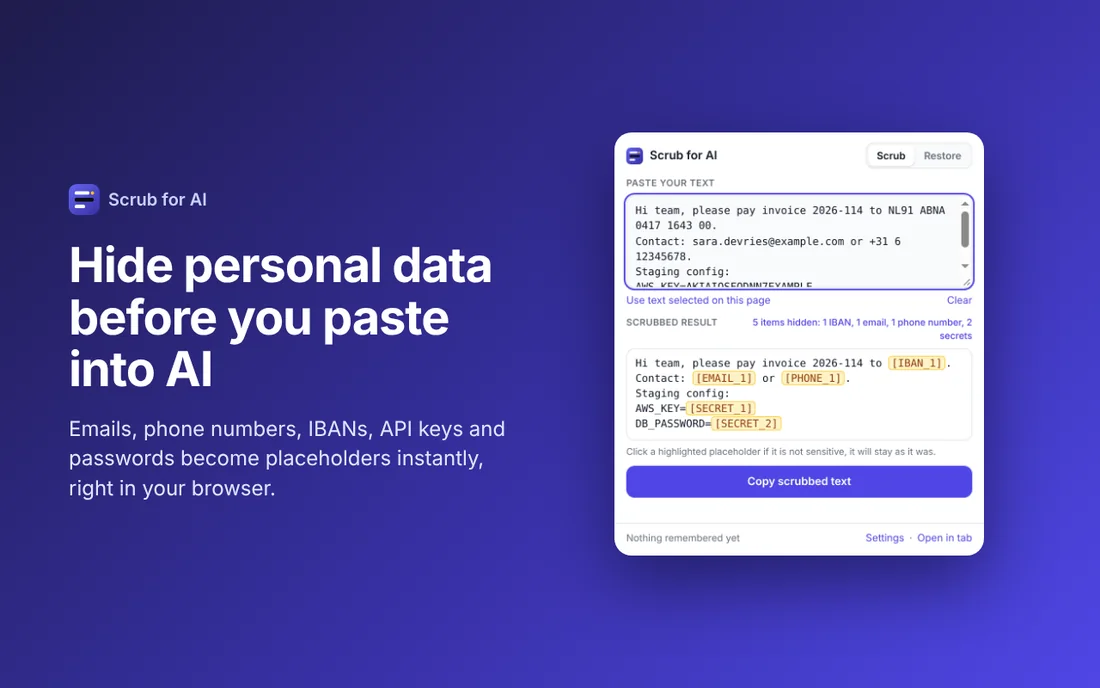
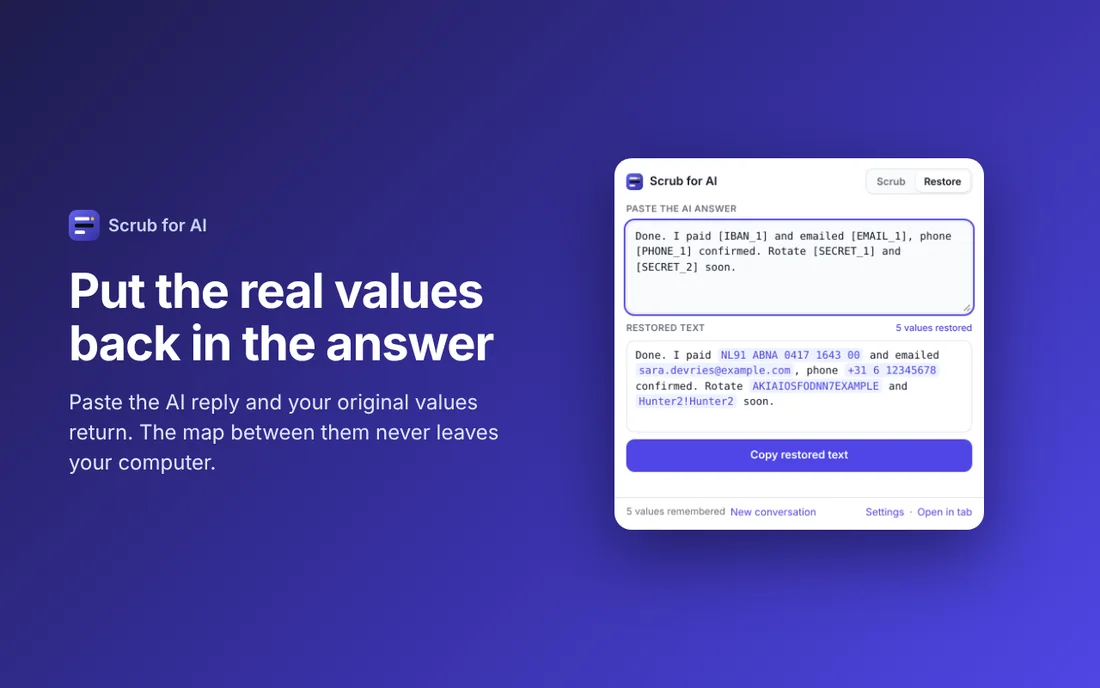
Scrub for AI replaces emails, phone numbers, IBANs, card numbers, API keys and passwords with neat placeholders like [EMAIL_1] before you paste into ChatGPT, Claude or Gemini. When the answer comes back, one click puts your original values back.
Launch offer until 30 November: 20 percent off every Pro version. The discount is applied at checkout with the code LAUNCH20.
Holiday offer until 31 December: 15 percent off every Pro version. The discount is applied at checkout with the code HOLIDAY15.
1. Scrub
Select text, right-click and choose Scrub selection and copy, or press Alt+Shift+X.
2. Paste
Paste the scrubbed text into your AI tool. Sensitive values are now placeholders.
3. Restore
Select the AI answer and press Alt+Shift+Z. Your original values return.
What it finds
- Email addresses and phone numbers, international and Dutch formats
- IBAN bank accounts and payment card numbers, both checked so ordinary numbers are left alone
- API keys and tokens for AWS, GitHub, Stripe, OpenAI, Anthropic, Google, Slack and more, plus JWTs and Bearer tokens
- Passwords and secrets in key=value text, JSON and config files, private key blocks and passwords inside URLs
- IP and MAC addresses, Dutch BSN and VAT numbers, birth dates after a label
- Your own terms: client names, project codenames, internal hostnames and your own patterns
Pro: protection you cannot forget
Paste Guard
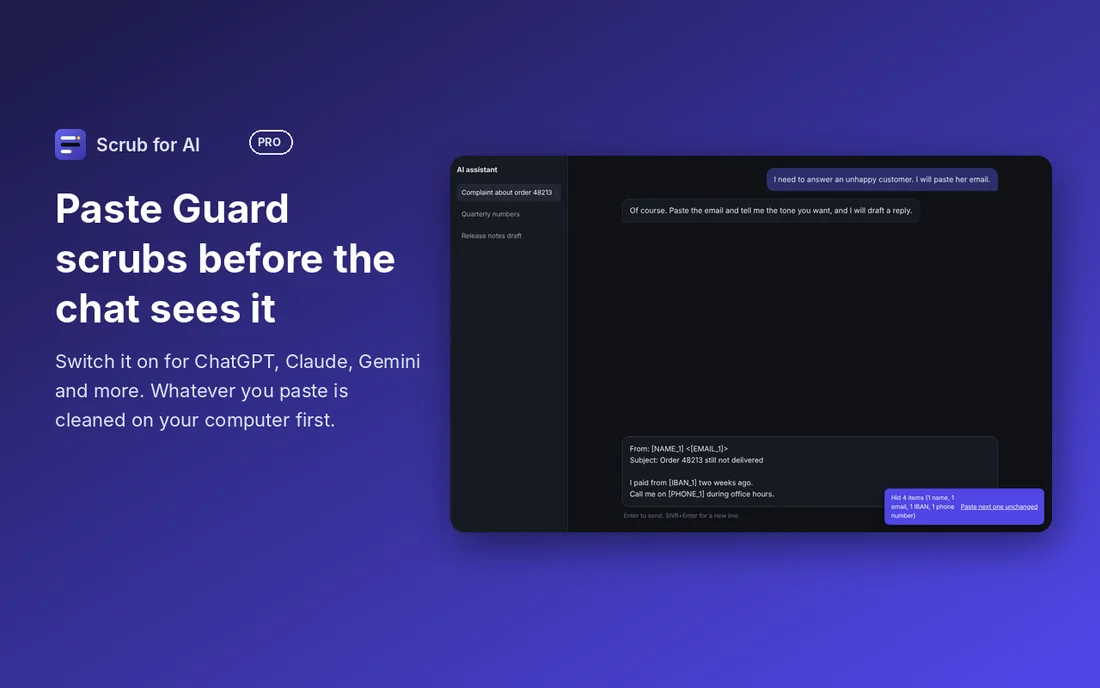
Switch it on for ChatGPT, Claude, Gemini, Copilot, Perplexity and more. Whatever you paste there is scrubbed on your computer before it reaches the chat box. Select and copy from the answer, and your original values are back.
Files
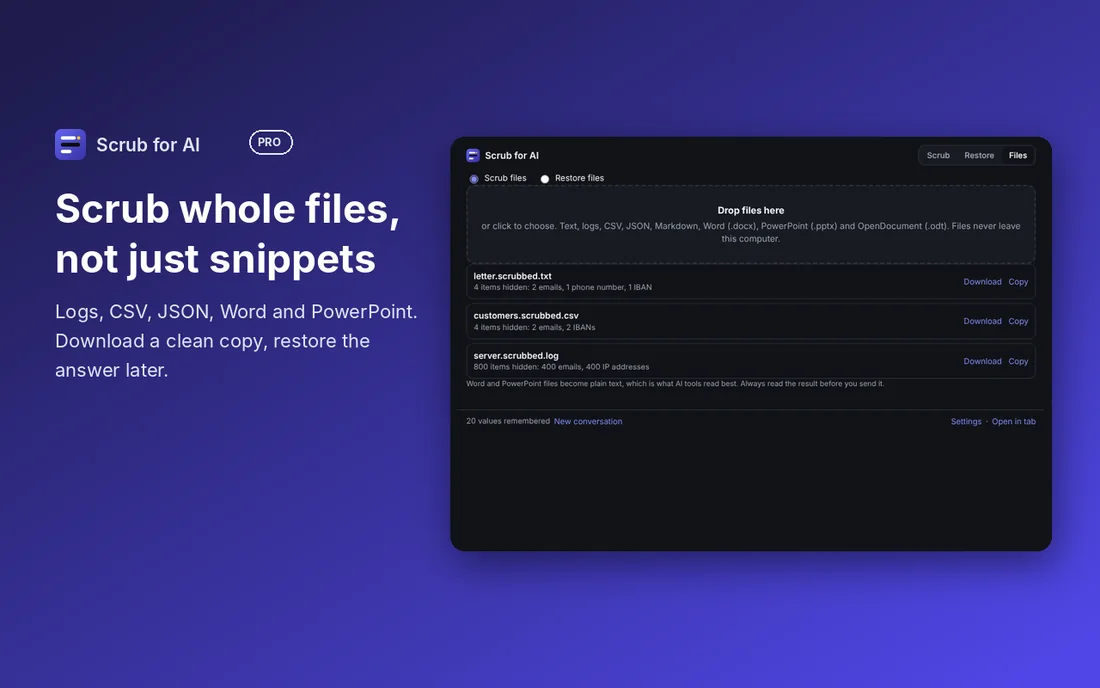
Drop a log, a CSV export, a Word document or a slide deck and download a scrubbed copy that is safe to upload. Drop the AI's output afterwards to put your values back. Files are never uploaded to us.
Pricing
Free
- Scrub and restore from any page, the popup or a shortcut
- All detectors, plus your own terms and patterns
- The online tool at muteware.com/scrub
- No limits, no account
Pro
- Paste Guard: automatic scrubbing when you paste into AI chats
- Original values restored when you copy from the answer
- Scrub whole files: logs, CSV, JSON, Word, PowerPoint, OpenDocument
- Restore whole files the AI gives back
- Files also work online at muteware.com/scrub
- Future Pro features included
Not sure yet? Start a free 7 day trial in the settings of the Chrome extension. No payment details, no account. The Firefox version gets the trial with its next update.
Pro is tied to the email address you use at checkout and works in every browser where you enter it. Payment and VAT invoice by Paddle, our merchant of record. Not happy? 14 day refund.
Private by design
Your text and files never leave your computer. Scrubbing makes no network requests, and there are no analytics and no ads. The extension reads a page only when you ask. The only request it can make is the optional Pro activation, which sends your purchase email to our licence service.
Scrub for AI finds patterns, it does not understand text. It cannot guarantee that everything sensitive is found, so always read the result before you share it.
Facts at a glance
| What it is | A browser extension and a free online tool that replace personal data and secrets in text with numbered placeholders, and put the real values back in the AI answer. |
|---|---|
| Made for | Sharing emails, logs, contracts and code with ChatGPT, Claude, Gemini or Copilot without sharing the personal data in them. |
| Browsers | Chrome and Firefox. The online version works in any modern browser. |
| Price | Free. Pro is a one time purchase of €19 now €15.20 now €16.15, no subscription. Team plans from €79 per year. |
| What it detects | Email addresses, phone numbers, IBANs, card numbers, API keys and tokens, passwords, IP addresses, Dutch BSN and VAT numbers, and your own terms. |
| Where your data goes | Nowhere. Detection and restoring happen in your browser. The list that links placeholders to real values stays on your computer. |
| Limits | It finds patterns, not meaning. It lowers the risk of sharing personal data and cannot promise to catch everything. |
| Publisher | Muteware, formerly Dehumanize, a trade name registered in the Netherlands. Contact: [email protected] |
Questions and answers
How do I remove personal data from text before pasting it into ChatGPT?
Paste the text into Scrub online, or select it on any page and use the Scrub for AI extension. Emails, phone numbers, IBANs, card numbers, API keys and passwords are replaced with placeholders such as [EMAIL_1]. Paste the scrubbed text into ChatGPT, then restore the real values in the answer.
Is my text sent to a server?
No. Detection and restoring run in your browser. The free extension makes no network requests while it works. Pro contacts our licence service only to check the purchase email address.
Does the AI still give a useful answer when it sees placeholders?
In most cases yes. The same value always gets the same placeholder, so [EMAIL_1] is the same person in the whole conversation and the AI can still follow who is who.
Does it find names and street addresses?
Not on its own. It recognises patterns such as email addresses, IBANs and keys. Names, addresses and project names are hidden when you add them as custom terms.
Does it work with Claude, Gemini and Copilot?
Yes. It works on the text itself, so the result can be pasted into any AI tool or website.
What does Scrub for AI cost?
The extension and the online version are free. Pro is a one time purchase of 19 euro without a subscription. It adds Paste Guard, which cleans text as you paste it into an AI chat, and scrubbing of whole files. Team plans start at 79 euro per year for up to 5 people.
Guides
- How to remove personal data from text before you paste it into AI
- Is it safe to paste code into ChatGPT or Claude? What to check first
- Dutch data and AI: how to handle IBAN, BSN, postcodes and phone numbers
- What you should never paste into ChatGPT, Claude or Gemini
- The placeholder method: useful AI answers without sharing real data