 Muteware
 Copy for AI
Copy any web page as clean Markdown.
Copy for AI is a free browser extension for Chrome and Firefox that copies a selection or a whole web page as clean Markdown. Paste it into ChatGPT, Claude, Notion or Obsidian. No menus, no cookie banners, no tracking links. Everything runs in your browser.
Launch offer until 30 November: 20 percent off every Pro version. The discount is applied at checkout with the code LAUNCH20.
Holiday offer until 31 December: 15 percent off every Pro version. The discount is applied at checkout with the code HOLIDAY15.
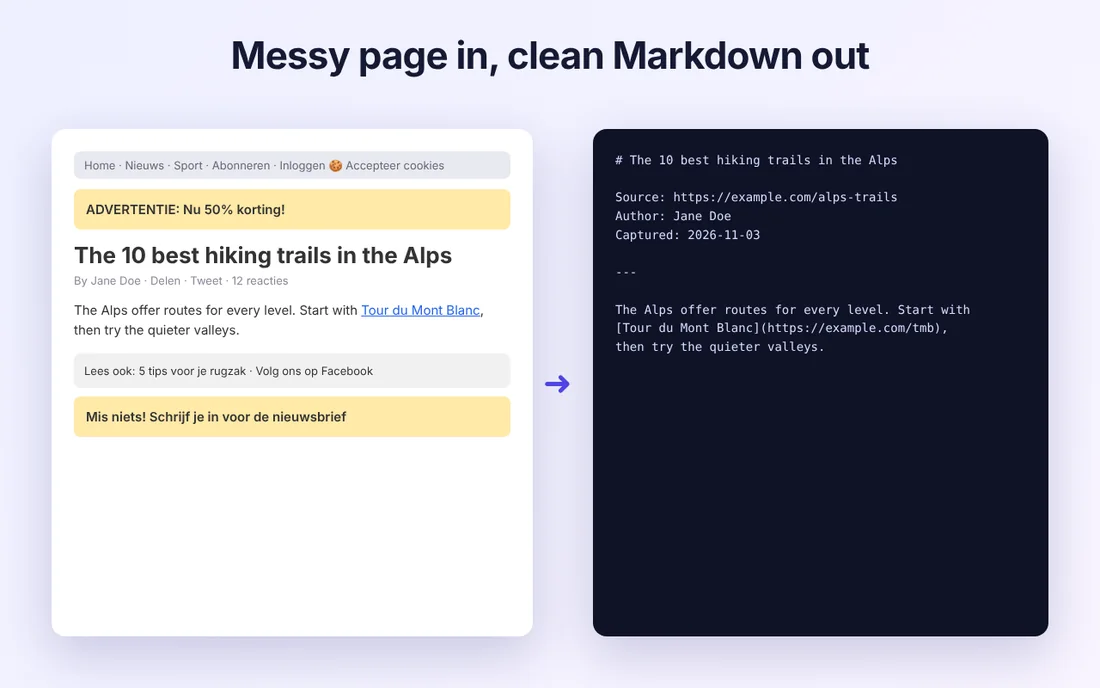
Reader mode extraction
Copy page keeps the article and drops the sidebar, comments and ads.
Real Markdown
Headings, lists, tables, links and code blocks survive. Images become short descriptions.
Clean links
utm_, fbclid, gclid and 30+ other tracking parameters are removed automatically.
Token count
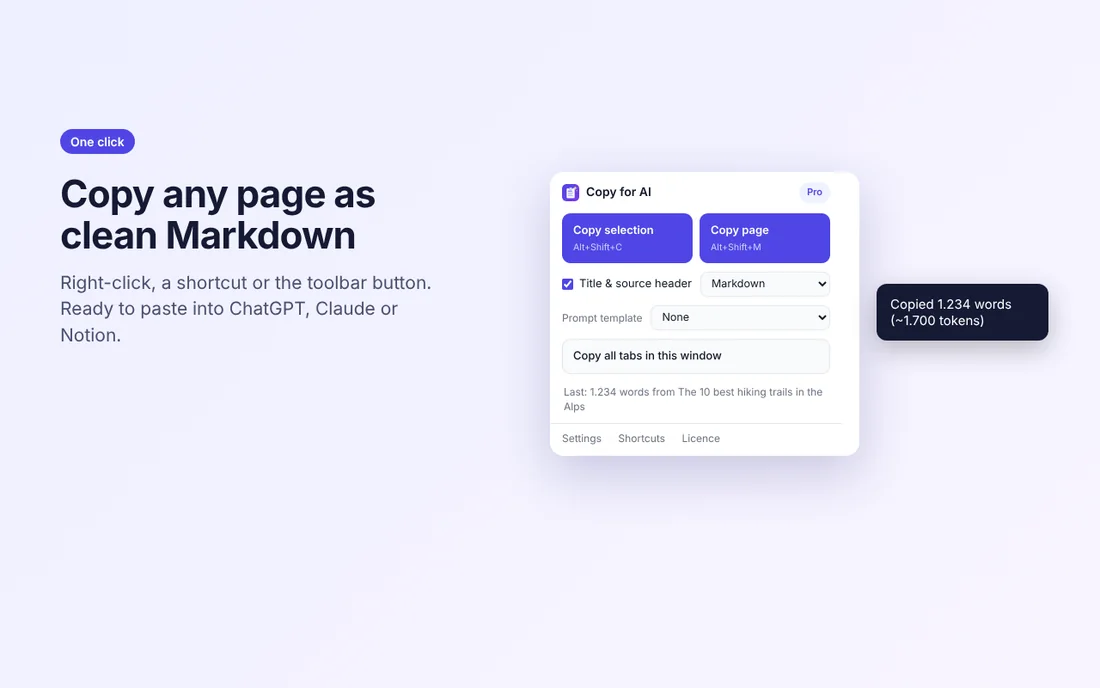
See how many words and tokens you copied, so you know what fits in a prompt.
Shortcuts everywhere
Right-click menu, Alt+Shift+C, Alt+Shift+M, or the toolbar button.
Private by design
No account, no analytics, no server. A page is read only when you ask.
Tables as well
Choose Copy a table in the popup or press Alt+Shift+T, then click the table on the page. It lands on your clipboard as a Markdown table with its rows and columns intact, ready to paste into a chat. Pro adds CSV, Excel and JSON, and copies all tables on a page at once.
Pricing
Free
- Copy selection, page or link as Markdown
- Copy a table as a Markdown table
- Title and source header
- Clean URLs and plain text mode
- Word and token count
Pro
- Everything in Free
- Prompt templates: wrap every copy in a ready made prompt
- Copy all open tabs as one document
- Tables as CSV, Excel or JSON, and all tables of a page at once
- Future Pro features included
Not sure yet? Start a free 7 day trial in the settings of the extension. No payment details, no account.
Prices include VAT where it applies, shown at checkout. You can ask for a full refund within 14 days, see the refund policy.
How activation works
After checkout, open the extension settings and enter the email address you paid with. The extension asks our licence service once, stores a signed licence in your Chrome profile and checks again only now and then. No account, no password.
Licence not working? Write to [email protected] with the email address you used at checkout.
Facts at a glance
| What it is | A browser extension that copies a selection or a whole web page as clean Markdown or plain text. |
|---|---|
| Made for | Pasting web content into ChatGPT, Claude, Gemini, Notion or Obsidian. |
| Browsers | Chrome and Firefox |
| Price | Free. Pro is a one time purchase of €9 now €7.20 now €7.65, no subscription. |
| What it removes | Menus, sidebars, ads, cookie banners and tracking parameters such as utm_, fbclid and gclid. |
| Where your data goes | Nowhere. The work happens in your browser. Nothing you copy or paste is uploaded, and there is no account. |
| Limits | It copies what is on the page. Images become short descriptions, not files. |
| Publisher | Muteware, formerly Dehumanize, a trade name registered in the Netherlands. Contact: [email protected] |
Questions and answers
How do I copy a web page as Markdown for ChatGPT or Claude?
Install Copy for AI, open the page and press Alt+Shift+M or use the toolbar button. The article is copied as clean Markdown, without menus, ads and cookie banners. Paste it into the chat. To copy only a part, select it first and press Alt+Shift+C.
Why Markdown instead of a normal copy and paste?
Markdown keeps the headings, lists, tables and code blocks of a page, and it leaves out the markup and clutter. The AI understands the structure, and the same content takes fewer tokens.
Is the page I copy sent to a server?
No. The conversion happens in your browser and the result goes straight to your clipboard. There is no account.
What does Copy for AI cost?
The extension is free. Pro is a one time purchase of 9 euro without a subscription. It adds prompt templates around every copy and copying all open tabs as one document.
Does the result work in Notion and Obsidian?
Yes. Both accept Markdown when you paste, so headings, lists and links arrive as real formatting.
Can Copy for AI copy a table from a web page?
Yes. Choose Copy a table in the popup or press Alt+Shift+T, then click the table on the page. It is copied as a Markdown table with its rows and columns intact. Pro also copies tables as CSV, Excel or JSON and copies all tables on a page at once.